A compact desk does not have to limit your ability to alternate between sitting and standing. The right converter can add ergonomic flexibility without taking over your work surface.
We selected 10 desk converters for small spaces in several widths and layouts, including single-platform models, keyboard-tray designs, and compact risers for monitors and laptops.
Best 10 Desk Converters for Small Spaces Picks for 2026
Compact Steel Lift
VIVO 26 in Standing Desk Converter
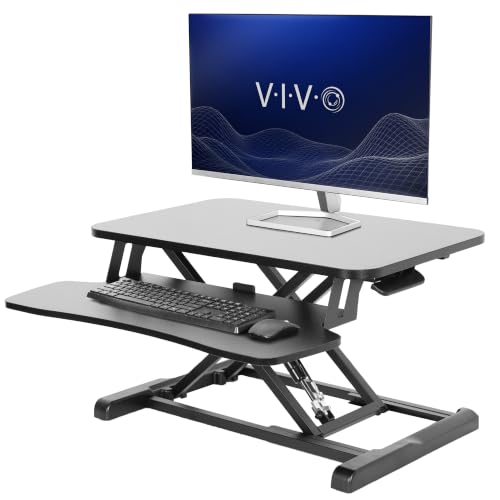
- 25.6-by-15.7-inch space-efficient desktop
- 33-pound desktop capacity
- Synchronized keyboard tray and 4.5–16.9-inch adjustment
Best For: Compact workstations needing sturdy sit-to-stand support
Wide White Riser
JOY worker 32 in Standing Desk Converter

- 31.5-by-15.7-inch dual-monitor surface
- 4.9–19.3-inch height range
- Removable synchronized keyboard tray
Best For: Small home offices that need dual-monitor capacity
Low-Profile Single Top
VIVO 29 in Standing Desk Converter

- 29.3-by-17.8-inch single-tier surface
- 1.8–16.2-inch adjustment range
- Fully preassembled for quick setup
Best For: Simple monitor-and-laptop workstations with no assembly
Compact Gas-Spring Lift
VIVO 25 in Standing Desk Converter

- 25-inch-wide two-tier workstation
- 5–16-inch gas-spring adjustment
- 17.6-pound total load capacity
Best For: Small desks needing separate monitor and keyboard levels
Best Compact Spring-Lift Pick
FLEXISPOT 28-Inch Desk Converter

- Nearly assembled for quick setup
- 33-pound desktop capacity
- Spring lift adjusts from 4.9 to 19.6 inches
Best For: Small-space users needing a stable single-monitor or laptop riser
Best Ultra-Slim Option

- 26.4-by-18.5-inch compact surface
- Five lockable height settings
- No assembly required
Best For: Laptop or single-monitor setups on space-constrained desks
Best Feature-Rich Clamp Model
28-Inch Converter with Keyboard Tray

- Compact triple-clamp base
- Pneumatic 4.7-to-16.1-inch adjustment
- Built-in tray, cup holder, slot, and magnetic panel
Best For: Organized workstations on compatible narrow desks
Compact Dual-Monitor Pick
VIVO 28 in Standing Desk Converter

- 27.6-by-15.8-inch surface
- Supports up to 28.6 pounds
- Pneumatic lift with minimal assembly
Best For: Small workstations needing room for multiple screens
Roomiest Small-Space Option
VIVO 32 in Standing Desk Converter

- 31.5-inch-wide dual-monitor surface
- 33-pound lift-assist capacity
- Includes synchronized keyboard tray
Best For: Compact offices with space for a wider dual-monitor riser
Smallest Laptop Setup

- Compact 27.5-by-12-inch surface
- Eight height settings up to 14 inches
- No assembly required
Best For: Laptop users with very limited desk depth
Compact Steel Lift – VIVO 26 in Standing Desk Converter
For shoppers comparing desk converters for small spaces, the VIVO DESK-V026KB offers a compact 25.6-by-15.7-inch work surface with a keyboard tray that rises with the desktop. Its straight-up lift design and minimal assembly make it practical for adding sit-to-stand flexibility without replacing your existing desk.
Best For: Small workstations needing a sturdy dual-monitor or laptop riser with an integrated keyboard tray.
Pros:
- Space-efficient 26-inch desktop fits many compact work areas.
- Supports up to 33 pounds on the desktop.
- Height adjusts from 4.5 to 16.9 inches with a simple-touch locking mechanism.
- Includes a keyboard tray that raises in sync with the top surface.
Cons:
- The 22.5-pound unit may be cumbersome to reposition frequently.
- The keyboard tray supports only up to 4.4 pounds.
This is a strong choice when stability and a dedicated keyboard tray matter more than having the smallest possible footprint. The steel frame, 33-pound desktop capacity, and three-year warranty add confidence for regular use.
Wide White Riser – JOY worker 32 in Standing Desk Converter
The JOY worker 32-inch riser is a useful option among desk converters for small spaces when you need room for two monitors but still want to work from an existing desk. Its 31.5-by-15.7-inch top, removable keyboard tray, and smooth handle-operated adjustment provide a flexible sit-to-stand setup.
Best For: Compact home offices that need a wide surface for dual monitors and a keyboard-and-mouse tray.
Pros:
- Wide top tier accommodates dual-monitor setups.
- Adjusts from 4.9 to 19.3 inches.
- Keyboard tray raises with the desktop and can be removed.
- Requires only a two-step keyboard-tray installation.
Cons:
- The 31.5-inch width may be too large for especially narrow desks.
- Top-tier capacity is limited to 28.6 pounds.
- The engineered-wood construction may offer less ruggedness than a steel-framed alternative.
This model balances a relatively compact depth with a generous width and high maximum lift. Measure your desk before buying, since its broad top may be better suited to small-to-medium workspaces than truly tiny surfaces.
Low-Profile Single Top – VIVO 29 in Standing Desk Converter
For desk converters for small spaces with a simple setup, the VIVO DESK-V000U provides a single 29.3-by-17.8-inch surface for a monitor, laptop, or full-sized keyboard. It arrives fully assembled and lifts straight upward, helping preserve the layout of a compact desk.
Best For: Users who want a no-assembly, single-tier riser for a monitor-and-laptop workstation.
Pros:
- Arrives completely preassembled.
- Adjusts from 1.8 to 16.2 inches in one motion.
- Single top provides room for a full-sized keyboard.
- Low-profile black design blends into many workspaces.
Cons:
- Supports up to 22 pounds, less than some larger VIVO models.
- No separate keyboard tray or second tier is included.
- The 17.8-inch depth may require careful placement on shallow desks.
This is a straightforward choice for compact setups where quick installation and a clean, single-level surface are priorities. It is less suitable if you need a dedicated elevated keyboard tray or substantial equipment capacity.
Compact Gas-Spring Lift – VIVO 25 in Standing Desk Converter
The VIVO 25-inch riser is designed for shoppers seeking desk converters for small spaces with separate monitor and keyboard levels. Its 25-by-18-inch upper desktop, 25-by-10-inch lower tier, and gas-spring adjustment offer an organized workstation while using a relatively compact width.
Best For: Smaller workstations that need a two-tier layout for a monitor, laptop, keyboard, and mouse.
Pros:
- Compact 25-inch-wide design fits many workstations.
- Gas-spring lift adjusts from 5 to 16 inches.
- Two-tier layout separates the display from the keyboard and mouse.
- Requires little to no assembly.
Cons:
- Total capacity is 17.6 pounds, with 5 pounds allocated to the keyboard tray.
- The 18-inch depth may be substantial for very shallow desks.
- Its 34.7-pound weight can make repositioning difficult.
This converter makes efficient use of vertical organization and is a practical fit when a separate keyboard level matters. Check the weight of your equipment carefully, as its capacity is lower than that of several larger risers.
Best Compact Spring-Lift Pick – FLEXISPOT 28-Inch Desk Converter
For shoppers comparing desk converters for small spaces, this FLEXISPOT model offers a compact 28-inch workstation for a laptop or single monitor. Its spring-based lift system, included keyboard tray, and nearly assembled design make it practical for switching between sitting and standing in an apartment, dorm, or minimalist office.
Best For: Small-space users who want a stable riser with a keyboard tray and generous weight capacity.
Pros:
- Nearly ready to use, requiring only keyboard-tray attachment.
- Mechanical spring system provides smooth height adjustment without relying on gas pressure.
- Supports up to 33 pounds on the desktop and 4.4 pounds on the keyboard tray.
- Height adjusts from 4.9 to 19.6 inches for seated or standing use.
Cons:
- At 31 pounds, it is relatively heavy to move regularly.
- The 24.9-inch depth may take substantial space on especially shallow desks.
This is a strong choice when stability and lifting range matter more than keeping the riser exceptionally lightweight. It is particularly well suited to a single-monitor setup that needs room for accessories without sacrificing a compact footprint.
Best Ultra-Slim Option – VIVO 26-Inch Single-Top Riser
The VIVO DESK-V001JF is a straightforward option for desk converters for small spaces, with a slim 26.4-by-18.5-inch surface for a laptop, single monitor, and full-size keyboard. It arrives pre-assembled and uses five lockable height settings, making it convenient for occasional standing without adding a bulky workstation.
Best For: Compact desks where a lightweight, no-assembly riser for one monitor or laptop is the priority.
Pros:
- Ultra-slim surface helps preserve limited desk space.
- Five lockable settings range from 1.8 to 15.9 inches.
- Pre-assembled and ready to use out of the box.
- Steel frame supports up to 17.6 pounds.
Cons:
- The single-top design does not include a separate keyboard tray.
- Its 17.6-pound capacity is lower than some heavier-duty converters.
- Five preset positions offer less continuous adjustment than a pneumatic system.
Choose this VIVO model when a slim footprint and simple operation are more important than extensive accessories or maximum load capacity. Its compact surface is best matched with a single-screen or laptop-focused setup.
Best Feature-Rich Clamp Model – 28-Inch Converter with Keyboard Tray
This 28-inch clamp-mounted model adds workspace features that can be useful when comparing desk converters for small spaces. Its compact base, keyboard tray, cup holder, device slot, and magnetic note panel help organize a narrow desk, while the pneumatic lift adjusts the workstation from 4.7 to 16.1 inches.
Best For: Users who want an organized laptop or monitor station with a clamp base and built-in accessories.
Pros:
- Triple-clamp base is designed to reduce wobbling and uses anti-slip pads.
- Pneumatic adjustment offers a smooth 4.7-to-16.1-inch range.
- Includes a keyboard tray, cup holder, device slot, and magnetic panel with six magnets.
- 28-by-17.7-inch desktop and 26.8-by-10.2-inch tray provide useful working room.
Cons:
- Assembly is required, although instructions and an installation video are provided.
- The desktop supports up to 17.6 pounds, with 5 pounds on the keyboard tray.
- The clamp mounting design requires a compatible desk edge and adequate clearance.
This converter makes the most sense for shoppers who value organization and a small-footprint clamp base over a no-assembly setup. Confirm that your desk can accommodate the mounting system before choosing it.
Compact Dual-Monitor Pick – VIVO 28 in Standing Desk Converter
For shoppers comparing desk converters for small spaces, the VIVO DESK-V028S offers a compact 27.6-by-15.8-inch work surface while still accommodating a dual-monitor or laptop-monitor setup. Its straight-up lift helps preserve the desk area around the riser.
Best For: Small workstations that need a sturdy standing option for multiple screens.
Pros:
- Space-efficient surface includes a keyboard tray that raises with the desktop.
- Steel frame supports up to 28.6 pounds.
- Pneumatic lift adjusts from 4.9 to 17.2 inches with a simple touch locking mechanism.
- Requires very minimal assembly.
Cons:
- The 15.8-inch depth may limit room for larger accessories.
- Its 28.6-pound capacity may not suit especially heavy equipment.
This is a practical middle ground for compact desks: more capable than a basic laptop riser, but smaller than a full-size standing workstation. The included keyboard tray and dual-monitor support make the most of its limited footprint.
Roomiest Small-Space Option – VIVO 32 in Standing Desk Converter
The VIVO DESK-V000K is a strong choice among desk converters for small spaces when you need extra width for two monitors. Its 31.5-by-15.7-inch surface and synchronized keyboard tray create a complete sit-stand setup without replacing your existing desk.
Best For: Small offices that can accommodate a wider converter and need a dual-monitor layout.
Pros:
- Wide surface is designed to fit dual monitors.
- Keyboard tray raises in sync with the desktop.
- 33-pound lift assist adjusts from 4.5 to 20 inches.
- Includes a 3-year manufacturer warranty and requires very minimal assembly.
Cons:
- The 31.5-inch width requires more desk space than the smaller VIVO models.
- The keyboard tray has a narrower 10.5-inch center section.
Choose this model when screen capacity matters more than the smallest possible footprint. It remains a tabletop riser, but its wider platform and higher weight rating provide useful flexibility for a compact dual-monitor office.
Smallest Laptop Setup – VIVO 28 in Single Top Riser
For especially tight work areas, the VIVO DESK-V011F keeps the footprint simple with a 27.5-by-12-inch single surface. It is one of the more straightforward desk converters for small spaces, particularly for laptop users who want standing height without a separate keyboard tray.
Best For: Laptop-based workstations and compact desks with limited available surface area.
Pros:
- 12-inch depth fits a variety of small desk layouts.
- Supports a laptop or lightweight monitor up to 11 pounds.
- Offers eight height settings from 2 to 14 inches above the desk.
- Arrives fully assembled and ready to use.
Cons:
- The 11-pound capacity is lower than the other listed VIVO converters.
- The single-tier surface does not include a keyboard tray.
- It is less suitable for heavier dual-monitor setups.
This riser is the best fit when conserving depth is the priority. Its preassembled design and multiple fixed height settings make it a convenient choice for a laptop-centered setup, though users with heavier equipment should consider a higher-capacity model.
How We Picked These Desk Converters for Small Spaces
We focused on the features that matter most when desk area is limited: overall width and depth, usable platform space, keyboard accommodation, height-adjustment range, construction, and everyday stability. A compact converter should leave room for essential accessories while fitting comfortably on the existing desk.
We also included several sizes and configurations rather than treating “small” as one fixed measurement. A 25- or 26-inch model may suit a narrow workstation, while a 28- or 32-inch converter can be a better choice for users with multiple displays or a larger keyboard.
Quick Comparison
| Best For | Recommended Size | Configuration to Consider |
|---|---|---|
| Very limited desk space | 25–26 inches | Compact platform or keyboard tray |
| Standard home-office setup | 28 inches | Single or two-level platform |
| Wide monitor or dual-screen setup | 29–32 inches | Large surface with strong stability |
| Separate keyboard and mouse placement | Any suitable width | Model with a keyboard tray |
Key Buying Factors for Small-Space Desk Converters
Measure the Desk First
Check both the available width and front-to-back depth. Leave clearance for cables, desk edges, and any monitor stand. A converter that technically fits may still feel cramped if it consumes the entire usable surface.
Choose the Right Work Surface
Single-top designs offer a simple, flexible platform for a monitor or laptop. Two-level models with a keyboard tray can improve positioning and keep input devices organized, but they may require more depth and clearance.
Check Load Capacity and Stability
Consider the combined weight of monitors, a laptop, keyboard, and accessories—not just the display. A wider or heavier setup benefits from a sturdy base and a platform that does not wobble during typing.
Prioritize Useful Height Adjustment
The adjustment range should support both comfortable sitting and standing positions. Look for smooth operation and enough clearance for your knees, chair, and monitor cables. If you use a laptop, account for screen height as well as keyboard position.
Account for Storage and Daily Movement
Desk converters are substantial accessories, so confirm where the unit will go when not in use. A lighter compact model may be easier to reposition, while a larger unit can provide more room but remain permanently in place.
Who Should Buy Which Desk Converters for Small Spaces?
Choose a 25- or 26-inch converter if your desk is narrow or you use one monitor and a compact keyboard. These models are generally the easiest fit for small bedrooms, apartments, and shared workstations.
Choose a 28-inch model for a balanced home-office setup with a monitor, keyboard, and mouse. This size often provides a useful compromise between workspace and desk footprint.
Choose a 29- or 32-inch converter if you need extra room for a wider monitor, dual displays, or larger peripherals. Measure carefully first, because the added surface area can crowd a shallow desk.
Choose a keyboard-tray design when typing comfort and a separate mouse area matter most. Choose a single-top design when flexibility, simpler organization, or laptop use is the priority.