A desk converter can turn an existing workstation into a more flexible sit-stand setup without replacing the entire desk. The best choice depends on your available surface, monitor arrangement, adjustment needs, and budget.
We compared 10 popular desk converters for home offices, including compact single-monitor models, spacious dual-monitor risers, and electric options designed for easier height changes.
Best 10 Desk Converters for Home Offices Picks for 2026
Best Compact Manual Converter
VIVO 32 in Standing Desk Converter

- 31.5-inch dual-monitor surface
- Synchronized keyboard tray
- 4.5- to 20-inch manual adjustment
Best For: Compact home offices needing a simple sit-stand upgrade
Best Electric Heavy-Duty Converter

- Push-button electric height adjustment
- 80-pound load capacity
- USB charging and cable management
Best For: Large dual-monitor workstations requiring frequent adjustments
Best Wide Manual Converter
VIVO 42 in Standing Desk Converter

- 42-inch dual-monitor surface
- Synchronized wide keyboard tray
- 4.5- to 20-inch height range
Best For: Wide desks and dual-monitor home-office setups
Best Space-Saving Pick
Mount-It! 32-Inch Standing Desk Converter
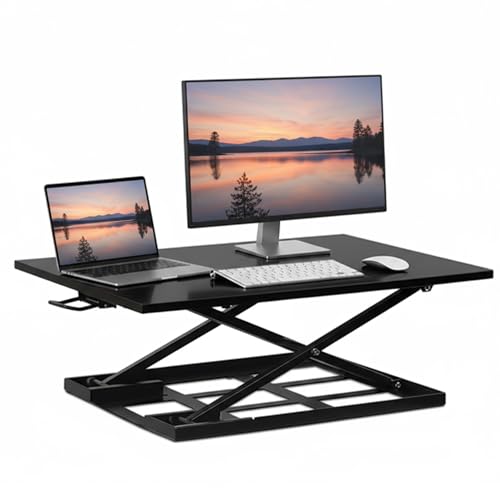
- Slim 2.5-inch lowered profile
- Quiet gas-spring lift to 16.9 inches
- Fully assembled with stable vertical movement
Best For: Small desks, apartments, and shared workspaces
Best for Dual Monitors
TechOrbits 32-Inch Standing Desk Converter

- Wide surface for dual monitors and accessories
- Adjusts up to 19.7 inches
- Includes keyboard tray and monitor stand
Best For: Multi-monitor home-office workstations
Best Wide Two-Tier Design
Vari Essential 36 Standing Desk Converter
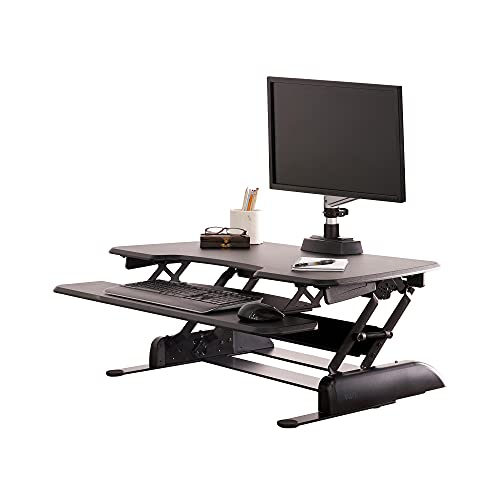
- 36-inch two-tier workspace
- 11 height settings up to 17.5 inches
- Fully assembled with dual-handle lift
Best For: Wide home-office setups needing separate monitor and accessory levels
Compact Choice
VIVO 29-Inch Single-Top Converter

- 29.3-inch work surface for a monitor or laptop
- Manual height range of 1.8 to 16.2 inches
- Preassembled design supports up to 22 pounds
Best For: Small desks and single-screen home office setups
Wide Electric Pick
Mount-It! 48.5-Inch Dual-Monitor Converter

- Motorized adjustment from 6 to 19.25 inches
- Wide platform fits two 27-inch monitors
- USB port, device slot, and keyboard tray included
Best For: Large dual-monitor home office workstations
Balanced Dual-Monitor Option

- 36-inch surface accommodates dual monitors
- Mechanical spring lift supports smooth adjustments
- Steel frame supports up to 33 pounds
Best For: Stable, moderate-width dual-monitor home office setups
Best Compact Manual Converter – VIVO 32 in Standing Desk Converter
If you want a straightforward way to add standing time at home, the VIVO 32-inch converter is a practical choice among desk converters for home offices. Its compact surface supports a dual-monitor setup, while the manual lift raises the workstation vertically without requiring a full desk replacement.
Best For: Home-office users who want a compact, manually adjustable converter with a keyboard tray and minimal assembly.
Pros:
- 31.5-inch surface provides room for dual monitors.
- Keyboard tray rises with the desktop for a coordinated workstation.
- 33-pound lift assist and 4.5- to 20-inch adjustment range.
- Includes a 3-year manufacturer warranty.
Cons:
- Manual adjustment requires lifting rather than push-button control.
- 33-pound maximum load may limit heavier equipment setups.
- Keyboard tray has a narrower center section.
This VIVO model keeps the setup simple and space-conscious. It is a good fit when you want dual-monitor support and occasional standing without paying for motorized adjustment.
Best Electric Heavy-Duty Converter – VersaDesk PowerPro 36 Inch
The VersaDesk PowerPro is designed for home-office users who prefer effortless height changes and a larger equipment capacity. As desk converters for home offices go, its electric lift, split-level layout, USB charging port, and cable-routing features make it suited to a more involved workstation.
Best For: Dual-monitor users who want push-button adjustment, generous capacity, and built-in workspace conveniences.
Pros:
- Quiet electric lift enables smooth push-button sit-to-stand transitions.
- Supports up to 80 pounds for monitors and equipment.
- Two-tier design separates monitors from the keyboard and accessories.
- Includes USB charging, three cable-routing grommets, and a lifetime warranty.
Cons:
- Monitor arms and monitors are not included.
- Requires access to power for motorized adjustment.
- Its larger 36-inch footprint may need more desk space.
With its high load rating and motorized controls, the PowerPro is the most feature-rich option in this group. It makes particular sense for users building a substantial dual-monitor home-office station.
Best Wide Manual Converter – VIVO 42 in Standing Desk Converter
The VIVO 42-inch converter gives home-office users extra horizontal room without moving to a full standing desk. Its wide desktop accommodates dual monitors, while the matching keyboard tray and vertical lift make it one of the more spacious manual desk converters for home offices.
Best For: Users who need a wide dual-monitor surface and prefer a manual converter with a synchronized keyboard tray.
Pros:
- 42-inch-wide top offers ample room for dual monitors.
- Keyboard tray raises with the main surface.
- Adjusts from 4.5 to 20 inches with lift assistance.
- Steel frame supports up to 33 pounds on the desktop.
Cons:
- Manual height adjustment is less convenient than an electric lift.
- Requires substantial desk width for its 42-inch footprint.
- Keyboard tray supports up to 4.4 pounds.
This model prioritizes usable width rather than compactness. Choose it when your desk can accommodate the extra span and your main goal is comfortable dual-monitor standing space.
Best Fully Assembled Converter – Vari Pro Plus 36 Standing Desk Converter
The Vari Pro Plus 36 is a polished option for shoppers who want a ready-to-use workstation rather than a project. Among desk converters for home offices, it stands out for its fully assembled two-tier design, spring-assisted lift, dual handles, and lifetime warranty.
Best For: Users seeking a sturdy, ready-to-use dual-monitor converter with assisted manual adjustment.
Pros:
- Arrives fully assembled with no tools required.
- 36-inch top tier accommodates dual monitors.
- Spring-assisted rowing lift and dual handles ease adjustments.
- Includes a lifetime warranty and 30-day risk-free return.
Cons:
- At 52.2 pounds, it is relatively heavy to reposition.
- Adjustment is spring-assisted rather than electric.
- Its wide, deep footprint requires a substantial desk.
The Pro Plus 36 favors solid construction and convenience over lightweight portability. It is a strong choice if you want to unbox a substantial sit-stand setup and begin working immediately.
Best Space-Saving Pick – Mount-It! 32-Inch Standing Desk Converter
For home offices that need more usable workspace without replacing the desk, this desk converter for home offices provides a compact sit-stand setup. Its 32-by-22-inch platform fits monitors, laptops, and accessories while the slim lowered profile helps preserve desk space.
Best For: Small desks, apartments, shared workspaces, and users who want a preassembled converter with a broad height range.
Pros:
- Gas-spring lift adjusts quietly from 2.5 to 16.9 inches.
- Stable vertical movement rises straight up and down without shifting forward.
- Large surface supports a monitor, laptop, and accessories while opening room on the existing desk.
- Arrives fully assembled and ready to use.
Cons:
- At 17.3 kilograms, it is relatively heavy to reposition.
- The 22-inch depth may require substantial desk depth.
The Mount-It! is a practical choice when space efficiency and simple setup matter most. Its low 2.5-inch starting height and straight-up lift make it especially suitable for compact home-office desks.
Best for Dual Monitors – TechOrbits 32-Inch Standing Desk Converter
This desk converter for home offices is designed for a broad workstation setup, with room for a computer or laptop, dual monitors, keyboard, mouse, speakers, and other accessories. Its pneumatic lift adjusts from 4.3 to 19.7 inches for flexible sit-stand positioning.
Best For: Home-office users who need a wide work surface, dual-monitor support, and a higher maximum standing position.
Pros:
- 32-inch-wide work area accommodates dual monitors and common peripherals.
- Height adjusts from 4.3 to 19.7 inches using the handle and pneumatic lift.
- Includes a keyboard tray and dual-monitor stand.
- Supports up to 33 pounds and uses an aluminum frame.
Cons:
- Requires minimal assembly to attach the keyboard tray.
- The particle-board surface may feel less premium than a solid-wood alternative.
- Its 4.3-inch minimum height may not suit every seated desk setup.
Choose the TechOrbits when equipment capacity and monitor organization are priorities. It offers a useful combination of width, included accessories, and a high maximum height, though setup is not completely tool-free.
Best Wide Two-Tier Design – Vari Essential 36 Standing Desk Converter
For shoppers seeking desk converters for home offices with extra width and a dedicated second tier, the Vari Essential 36 offers a 36-inch two-level workspace. Its spring-assisted dual-handle lift provides 11 height settings and raises the platform up to 17.5 inches.
Best For: Users who want a wide two-tier riser for a monitor and accessories with no assembly required.
Pros:
- 36-inch-wide two-tier design separates the monitor area from accessories.
- Dual-handle spring-assisted lift offers 11 height settings up to 17.5 inches.
- Ships fully assembled for quick placement on an existing desk.
Cons:
- Its 53.3-pound weight makes moving it less convenient.
- Load capacity is limited to 25 pounds.
- The 24-inch depth requires a suitably deep desktop.
The Vari Essential 36 is a strong fit for a spacious home-office workstation where a two-tier layout and wide surface are more important than portability. Its fully assembled design also keeps installation straightforward.
Compact Choice – VIVO 29-Inch Single-Top Converter
For shoppers comparing desk converters for home offices, the VIVO DESK-V000U is a compact, ready-to-use option for a single monitor or laptop setup. Its 29.3-inch surface includes enough room for a full-sized keyboard, while the manual riser adjusts from 1.8 to 16.2 inches without requiring assembly.
Best For: Small home office desks and users who want a straightforward single-screen sit-stand setup.
Pros:
- Preassembled and ready to use out of the box.
- Height adjusts in one motion from 1.8 to 16.2 inches.
- Compact surface supports monitor, laptop, or keyboard layouts and holds up to 22 pounds.
Cons:
- Manual adjustment requires lifting the workstation rather than using a motor.
- The 22-pound capacity and single top are less suited to larger multi-monitor setups.
This converter prioritizes simplicity and space efficiency. It is a practical pick when you need basic sit-stand flexibility without adding a large or complicated workstation to your desk.
Wide Electric Pick – Mount-It! 48.5-Inch Dual-Monitor Converter
Among desk converters for home offices, the Mount-It! MI-7962 stands out for its wide electric platform and dual-monitor capacity. The motorized lift moves from 6 to 19.25 inches, while the integrated USB port, device slot, and keyboard tray add convenience for a broad workstation.
Best For: Home office users building a spacious dual-monitor setup with powered height adjustment.
Pros:
- 48.5-inch surface fits two 27-inch monitors, a laptop, and accessories.
- Electric height adjustment provides transitions from 6 to 19.25 inches.
- Includes a 35.5-inch keyboard tray, USB port, and front device slot.
- Steel construction supports up to 33 pounds and includes a lifetime manufacturer warranty.
Cons:
- Its extra-wide footprint may not suit smaller desks.
- The keyboard tray requires attachment with the included hardware.
This is the most feature-rich option of the three, especially if you prefer push-button adjustment and need room for multiple displays. Measure your existing desk carefully before choosing this wide riser.
Balanced Dual-Monitor Option – FLEXISPOT 36-Inch Desk Riser
The FLEXISPOT 36-inch riser is a balanced choice among desk converters for home offices, combining a dual-monitor-friendly surface with a mechanical spring lift system. Its reinforced steel frame supports up to 33 pounds on the top, and the included keyboard tray helps keep your workspace organized.
Best For: Professionals and remote workers who need a stable, standard-width dual-monitor workstation.
Pros:
- 36-inch surface accommodates dual monitors with additional accessory space.
- Mechanical spring system provides smooth, stable height adjustment without relying on gas springs.
- Reinforced steel frame supports up to 33 pounds, while the keyboard tray holds 4.4 pounds.
- Nearly assembled setup requires attaching the keyboard tray.
Cons:
- It is substantially heavier than the compact VIVO option at 34.5 pounds.
- The supplied notes do not specify the converter’s minimum working height.
FLEXISPOT offers a middle ground between compact risers and oversized electric models. Its spring-assisted design and 36-inch width make it well suited to a stable, everyday dual-monitor setup where a moderate footprint matters.
How We Picked the Best Desk Converters for Home Offices
We focused on the factors that matter most in a home workspace: usable desktop area, height-adjustment range, lifting method, monitor capacity, stability, cable-management potential, and overall footprint. The roundup includes manual gas-spring and spring-assisted models as well as motorized converters, so shoppers can compare convenience against price and mechanical simplicity.
We also considered how each design may fit common home-office layouts. A wide converter can support two monitors and accessories, while a narrower single-tier unit may work better on a small desk or in a shared room. Product specifications can vary by configuration, so confirm the current dimensions, weight capacity, and included accessories before ordering.
Quick Comparison
| Best for | Look for | Recommended style |
|---|---|---|
| Small workspaces | Compact width and shallow depth | 29- or 32-inch single-top converter |
| Dual monitors | Wide surface and high weight capacity | 36-, 42-, or 48.5-inch model |
| Frequent height changes | Low-effort, precise adjustment | Electric converter with push-button controls |
| Keyboard and accessories | Separate keyboard tray or two-tier layout | Two-tier standing desk converter |
| Lower budgets | Manual lift and essential features | Basic gas-spring or spring-assisted model |
Key Buying Factors for Desk Converters for Home Offices
Size and Desk Compatibility
Measure the desk’s width and depth, leaving room for the converter’s base and any rear clearance it needs. A large riser may provide better monitor spacing but can crowd a shallow desk. Also check whether the converter’s lowest position leaves your keyboard at a comfortable seated height.
Monitor Setup and Weight Capacity
Choose a surface wide enough for your monitor arrangement, keyboard, mouse, speakers, and daily accessories. Dual-monitor users should verify both the usable top width and the total supported weight. Heavy displays, monitor stands, and laptops all count toward the load.
Manual Versus Electric Adjustment
Manual models are usually simpler and do not require a power connection, but they may take more effort to raise or lower when fully loaded. Electric converters offer convenient push-button positioning and can be preferable when you switch often between sitting and standing. Make sure the power cord can reach a nearby outlet without creating a trip hazard.
Stability and Ergonomics
Look for a broad base, a stable keyboard area, and smooth movement. When standing, your elbows should remain near a relaxed 90-degree angle, with the monitor positioned so you are not constantly tilting your head. A converter cannot correct every ergonomic problem, so consider your chair, monitor height, and available legroom as part of the setup.
Who Should Buy Which Desk Converters for Home Offices?
- Choose a compact VIVO or similar 29- to 32-inch model if you have limited desk space, use one monitor, or want a straightforward upgrade.
- Choose a 36-inch two-tier or spacious model if you need room for a monitor, keyboard, laptop, and accessories without moving items between positions.
- Choose a 42- or 48.5-inch converter for a broad dual-monitor workstation, provided your existing desk can safely support its footprint and load.
- Choose an electric VERSADESK, Mount-It!, or comparable model if effortless, frequent height changes are more important than minimizing cost or cords.
- Choose a manual gas-spring model if you want adjustable height without adding another powered device to your home office.
Before buying, compare the converter’s dimensions with your desk, measure your monitor and keyboard footprint, and verify the height range for both sitting and standing. Those checks usually matter more than appearance alone.