If you’re struggling with wrist pain from long hours of typing, finding the right ergonomic keyboard can make a significant difference. With so many options out there, it’s essential to choose one that truly supports your needs. In this guide, we’ll explore ten expert-recommended ergonomic keyboards designed to alleviate discomfort and improve your typing experience. Let’s uncover which of these innovative designs could be the solution you’ve been looking for.
Logitech Wave Keys Wireless Ergonomic Keyboard

If you’re looking for a keyboard that prioritizes your comfort during long typing sessions, the Logitech Wave Keys Wireless Ergonomic Keyboard is an excellent choice. Its wavy design promotes a natural typing position, while the cushioned palm rest, made of memory foam, reduces wrist pressure. Weighing just 2.1 pounds and measuring 14.8L x 8.62W x 1.18H inches, it fits snugly on your desk. You’ll appreciate its Bluetooth and Logi Bolt Receiver connectivity options, plus the ability to switch between devices seamlessly. With up to three years of battery life, this keyboard supports your productivity without hassle.
Best For: Those seeking a comfortable and ergonomic keyboard for extended typing sessions, particularly users of multiple devices.
Pros:
- Ergonomic Design: The wavy shape and cushioned palm rest promote a more natural typing posture and reduce wrist strain.
- Multi-Device Connectivity: Easily switch between devices using Bluetooth or the Logi Bolt Receiver, enhancing productivity.
- Long Battery Life: With up to three years of battery life, you can work without frequent interruptions for battery changes.
Cons:
- Weight: At 2.1 pounds, it may be heavier than some users prefer for portable use.
- Limited Customization: While it has 19 customizable buttons, some users may find the options insufficient for advanced needs.
- Compatibility Issues: Although it supports multiple operating systems, some features may not be fully optimized across all platforms.
Arteck Split Ergonomic Keyboard for Windows

The Arteck Split Ergonomic Keyboard is an excellent choice for anyone who spends long hours typing on a Windows computer and is seeking relief from wrist pain. Its split design positions your wrists and forearms naturally, reducing strain. With a soft cushioned wrist rest, you’ll find comfort even during extended sessions. Setup is a breeze, thanks to the nano USB receiver, which conveniently stores at the back of the keyboard. Plus, the rechargeable lithium battery lasts up to six months on a single charge. The package includes everything you need, along with a 24-month warranty and dedicated customer support for peace of mind.
Best For: Individuals who spend long hours typing on Windows computers and seek comfort and relief from wrist pain.
Pros:
- Ergonomic design reduces wrist strain and promotes natural positioning.
- Soft cushioned wrist rest enhances comfort during extended typing sessions.
- Long battery life of up to six months on a single charge provides convenience.
Cons:
- Limited compatibility as it is designed specifically for Windows computers.
- Wireless connection may experience interference in crowded environments.
- Learning curve for users transitioning from traditional keyboard layouts.
Logitech Ergo K860 Wireless Ergonomic Keyboard

For those who spend long hours typing, the Logitech Ergo K860 Wireless Ergonomic Keyboard offers a game-changing solution to wrist discomfort. Its split keyframe reduces wrist bending by 25%, while the curved wrist rest with memory foam enhances your comfort. With adjustable palm lift angles, you can find the perfect position whether seated or standing. Plus, its Perfect Stroke keys provide fluid typing. You’ll appreciate the multi-device connectivity via Bluetooth or USB, making switching effortless. Made from 71% recycled materials, it’s sustainable too. Rated 4.5 stars, the Ergo K860 is a solid choice for anyone seeking relief from wrist pain.
Best For: Those who spend extended hours typing and seek ergonomic relief from wrist discomfort.
Pros:
- Ergonomic design reduces wrist bending by 25% and offers enhanced support.
- Multi-device connectivity allows easy switching between devices via Bluetooth or USB.
- Made from 71% recycled materials, promoting sustainability.
Cons:
- May take time to adjust for users accustomed to traditional keyboards.
- Heavier than standard keyboards, which may affect portability.
- Limited customization options compared to some advanced gaming keyboards.
Incase Ergonomic Keyboard by Microsoft
Designed with your comfort in mind, the Incase Ergonomic Keyboard by Microsoft is an ideal choice for anyone struggling with wrist pain. Its split keyset design promotes natural wrist posture, reducing fatigue during long typing sessions. The cushioned palm rest, covered in premium fabric, guarantees all-day comfort. With built-in shortcuts for Microsoft 365, emojis, and media controls, you’ll enhance your productivity effortlessly. The integrated number pad simplifies number entry, while the USB-A wired connection offers reliable performance. Compatible with Windows 10 and higher, this durable keyboard comes with a 1-year warranty, making it a smart investment for your workspace.
Best For: Those who experience wrist pain or discomfort during prolonged typing sessions and seek an ergonomic solution.
Pros:
- Ergonomist-approved split keyset design promotes natural wrist posture and reduces fatigue.
- Cushioned palm rest covered in premium fabric ensures all-day comfort.
- Built-in shortcuts and integrated number pad enhance productivity and efficiency.
Cons:
- Wired connectivity may limit mobility compared to wireless options.
- Limited compatibility with operating systems, requiring Windows 10 or higher.
- The membrane keyboard type may not satisfy users who prefer mechanical switches.
GORILLA GRIP Silky Memory Foam Wrist Rest for Keyboard and Mouse (2 Piece Pad)
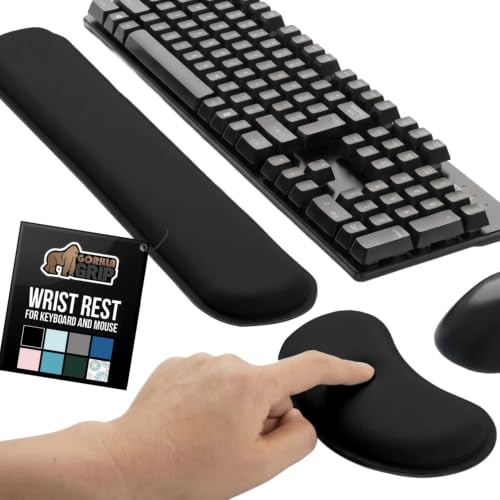
Looking for a way to ease wrist discomfort during long hours at your desk? The GORILLA GRIP Silky Memory Foam Wrist Rest, featuring a two-piece pad, is designed just for you. With an ultra-thick memory foam core and a soft spandex top, it provides exceptional comfort. Its ergonomic design elevates your wrists, reducing strain while typing or using your mouse. Plus, the slip-resistant backing keeps it stable on your desk. Rated 4.4 stars by over 6,800 customers, this durable, stain-resistant wrist rest is easy to clean and perfect for long work sessions. Say goodbye to wrist pain and hello to comfort!
Best For: Those who spend long hours typing or using a mouse and experience wrist discomfort.
Pros:
- Provides exceptional comfort with ultra-thick memory foam and soft spandex top.
- Ergonomic design elevates wrists, reducing strain and promoting better posture.
- Slip-resistant backing ensures stability, suitable for most desk surfaces.
Cons:
- May take time to adjust to the height and feel of the wrist rest.
- Limited color options, only available in black.
- Some users may find it too soft for their preference in wrist support.
Perixx PERIBOARD-512B Wired Ergonomic Keyboard

The Perixx PERIBOARD-512B Wired Ergonomic Keyboard stands out as an excellent choice for anyone seeking relief from wrist pain during long typing sessions. Its split-key ergonomic design reduces wrist bending, while the old-school curved row layout promotes a natural typing posture. You’ll appreciate the contoured keycaps that enhance fingertip comfort. With long key travel and tactile feedback, every keystroke feels satisfying and responsive. Plus, it’s durable, lasting up to 20 million keystrokes. Compatible with Windows, this keyboard’s built-in media keys and single-color backlighting make it a practical addition to your workspace. Experience the difference in just a couple of weeks!
Best For: Individuals seeking an ergonomic keyboard to alleviate wrist pain during extended typing sessions.
Pros:
- Ergonomic split-key design reduces wrist strain and promotes a natural typing posture.
- Long key travel with tactile feedback enhances typing satisfaction and responsiveness.
- Durable construction, rated for up to 20 million keystrokes, ensures longevity.
Cons:
- Limited compatibility with operating systems as it is primarily designed for Windows.
- Wired connectivity may restrict mobility compared to wireless alternatives.
- Single color backlighting may not appeal to users looking for customizable lighting options.
MEKASS Ergonomic Wrist Rest for Keyboard and Mouse

If you’re spending long hours typing or gaming, the MEKASS Ergonomic Wrist Rest for Keyboard and Mouse is a perfect choice for alleviating wrist pain and discomfort. Made from medical-grade memory foam, it molds to your wrists, providing essential support. The unique massage pattern enhances relaxation, while the non-slip silicone base guarantees stability on any surface. Its silky smooth lycra cover keeps you comfortable throughout your session. With dimensions designed for ideal fit, this wrist rest promotes blood circulation and reduces strain on your elbows and shoulders. Plus, its washable feature makes maintenance a breeze. Experience pain relief and comfort now!
Best For: Those who spend long hours at a computer for work or gaming and seek relief from wrist pain and discomfort.
Pros:
- Soft memory foam adapts to wrist shape for personalized support.
- Non-slip silicone base ensures stability on various surfaces.
- Ergonomic design promotes blood circulation and reduces strain on elbows and shoulders.
Cons:
- May take time to get used to if transitioning from a traditional wrist rest.
- Some users may find it too soft for their preference.
- Limited color options available for personal customization.
Nulea RT07B Wireless Ergonomic Split Keyboard
For those struggling with wrist pain or discomfort from prolonged typing, the Nulea RT07B Wireless Ergonomic Split Keyboard is a top choice. Its ergonomic split layout minimizes forearm twisting, easing carpal tunnel syndrome symptoms. The thorough palm rest supports your wrists, ensuring a comfortable typing experience. With dual-mode connectivity via Bluetooth and 2.4G wireless, it’s easy to connect to your devices. Plus, its scissor-switch keys offer stability and rapid rebound for smooth typing. Rechargeable via USB-C, you’ll enjoy up to 200 hours of battery life. Compatible with Windows, Mac, and select Amazon Fire HD models, it’s built for versatility.
Best For: Individuals experiencing wrist pain or discomfort from prolonged typing who seek a comfortable and ergonomic keyboard solution.
Pros:
- Ergonomic split layout reduces forearm twisting, alleviating discomfort.
- Dual-mode connectivity (Bluetooth and 2.4G wireless) allows for versatile device pairing.
- Long battery life of up to 200 hours with USB-C rechargeable capability.
Cons:
- The ergonomic design may take time for users to get accustomed to.
- Limited compatibility with certain older devices.
- Some users may prefer a more traditional keyboard layout.
ProtoArc Backlit Bluetooth Ergonomic Keyboard (EK01 Plus)

Designed with comfort in mind, the ProtoArc Backlit Bluetooth Ergonomic Keyboard (EK01 Plus) is ideal for anyone seeking relief from wrist pain during long typing sessions. Its curved split-frame design minimizes strain, while the scooped keys make typing effortless. You’ll appreciate the cushioned wrist rest, which offers 54% more support and helps reduce fatigue. With adjustable tilt feet, you can customize the angle for best wrist relaxation. Plus, the backlighting and long battery life guarantee you can work comfortably, day or night. Seamlessly switch between devices and enjoy a better typing experience with the ProtoArc EK01 Plus!
Best For: Those who experience wrist discomfort or fatigue during long typing sessions and seek an ergonomic keyboard solution.
Pros:
- Comfortable Design: Curved split-frame and scooped keys reduce wrist strain and enhance typing ease.
- Versatile Connectivity: Easily switch between three devices using Bluetooth or 2.4G USB.
- Long Battery Life: Adjustable backlighting with extended battery performance, lasting up to 100 days without backlight.
Cons:
- Learning Curve: Users may require 1-2 weeks to fully adapt to the keyboard layout.
- Compatibility Limitations: Not compatible with Mac OS/iOS in 2.4G mode, requiring Bluetooth for full functionality.
- Charging Cautions: Fast chargers should be avoided to maintain battery performance.
Gimars Ergonomic Keyboard and Mouse Wrist Rest Set

Emphasizing comfort and support, the Gimars Ergonomic Keyboard and Mouse Wrist Rest Set is perfect for anyone who spends long hours typing or gaming. With its 1.2-inch ultra-thick memory foam, this set alleviates wrist pain and strain, ensuring an ideal ergonomic height. The grooved design fits your wrists perfectly, enhancing comfort during prolonged use. Constructed with a breathable spandex fabric top, thick memory foam inner layer, and a stable rubber base, it offers durability. Plus, the non-slip backing keeps it securely in place. Cleaning is simple; just wipe it down, and you’re good to go. Enjoy your typing experience with Gimars!
Best For: Those who spend extended periods typing or gaming and seek ergonomic support to alleviate wrist pain.
Pros:
- Provides optimal ergonomic height with 1.2-inch ultra-thick memory foam for comfort and support.
- Non-slip rubber backing ensures stability on various surfaces, preventing movement during use.
- Easy to clean with waterproof and stain-resistant fabric; simply wipe with a damp cloth.
Cons:
- May be too thick for users who prefer a lower wrist rest height.
- The grooved design might not suit everyone’s wrist shape, affecting comfort for some.
- Limited color options available, which may not appeal to all aesthetic preferences.
Factors to Consider When Choosing Ergonomic Keyboards for Wrist Pain
When you’re choosing an ergonomic keyboard for wrist pain relief, it’s essential to take into account several key factors. Pay attention to the layout design, wrist support features, and connectivity options that best suit your needs. Also, reflect on battery life and the materials used for durability to guarantee long-term comfort and functionality.
Key Layout Design
Choosing the right key layout design is essential for anyone looking to alleviate wrist pain while typing. A split key design can greatly reduce forearm twisting, promoting a more comfortable typing experience. Look for ergonomic layouts that separate left and right zones to enhance your posture. Curved keyframes and scooped designs fit your hands’ natural contours, encouraging a relaxed position and reducing discomfort. Additionally, adjustable tilt legs let you customize the keyboard angle, helping maintain a neutral wrist position and minimizing the risk of repetitive strain injuries. Finally, consider keyboards with cushioned palm rests, which provide extra support and comfort, allowing you to rest your wrists without creating excessive pressure while typing.
Wrist Support Features
Wrist support features are essential for enhancing comfort and preventing strain during long typing sessions. Look for ergonomic keyboards that include cushioned wrist rests made from memory foam or soft fabric. These materials reduce pressure on your wrists and provide a comfortable typing experience. Adjustable palm lifts or wrist rests can also help you maintain a natural wrist position, minimizing the risk of strain. Consider keyboards with a split layout, which aligns your wrists and forearms in a more natural position, reducing twisting. A thorough palm rest can elevate your wrists, alleviating discomfort during extended use. Finally, non-slip bases on wrist supports add stability, preventing movement and promoting better ergonomic positioning while you type.
Connectivity Options Available
Finding the right ergonomic keyboard goes beyond wrist support features; connectivity options play a significant role in your overall typing experience. Ergonomic keyboards often offer various connectivity choices, like Bluetooth and USB, catering to your device compatibility needs. If you prefer flexibility, consider a dual-mode keyboard that allows you to switch between wired and wireless connections effortlessly. Bluetooth connectivity can seamlessly pair with multiple devices, so you can shift from your computer to a tablet or smartphone with ease. Some models even include a USB dongle for a stable wireless connection, especially useful in high-interference areas. Remember, your connectivity choice can also affect battery life, as wireless options typically require more frequent charging or battery replacements compared to wired ones.
Battery Life Considerations
When considering an ergonomic keyboard, battery life is an essential aspect that can greatly impact your typing experience. Some models boast impressive battery life of up to three years, while others might need recharging every few months. Take into account the type of battery; rechargeable lithium options offer convenience but require periodic charging, which can interrupt usability. Look for keyboards with power-saving features like automatic sleep modes to extend battery life further. Additionally, remember that connectivity can influence battery consumption; Bluetooth connections may drain power faster than wireless USB receivers. Assess your regular use patterns, as heavy daily usage will likely necessitate a keyboard with longer battery life to avoid frequent interruptions for charging or battery replacement.
Material and Durability
Choosing the right materials for your ergonomic keyboard can make a significant difference in both durability and comfort. Look for keyboards made from high-quality plastics, as they can enhance tactile feel and responsiveness. Recycled plastics not only offer sustainability but also stand up well against wear and tear. Fabrics that are stain-resistant can keep your keyboard looking good, even with daily use. Additionally, if your keyboard has palm rests, opt for those with quality memory foam for added comfort, as foam quality can vary. Finally, consider the weight of the keyboard; heavier models often use sturdier materials that resist damage and provide better stability during long typing sessions.
Size and Weight
The size and weight of an ergonomic keyboard are vital for maintaining a comfortable typing posture and reducing wrist pain. The right dimensions help keep your shoulders and wrists in a natural position, alleviating discomfort. Lighter keyboards are easier to adjust and reposition, which is great if you frequently change your typing setup. Compact keyboards, with their smaller footprint, encourage more natural hand placement and reduce strain from reaching. However, keep in mind that the weight can impact stability; a heavier keyboard tends to stay in place better, minimizing unnecessary wrist movement. Ergonomic designs tailored to your hand span and typing posture can notably enhance comfort and lower the risk of repetitive strain injuries, making size and weight vital considerations.
Customization Capabilities
Customization capabilities play an essential role in finding the right ergonomic keyboard for wrist pain relief, as they allow you to tailor your typing experience to your specific needs. Look for keyboards with programmable keys that let you assign functions or shortcuts, enhancing your productivity. Many models offer software support for personalizing shortcuts, making it easier to adapt to your typing habits and reduce strain. Additionally, adjustable backlighting and key response settings can improve comfort in various lighting conditions. Consider keyboards with customizable profiles to switch setups for different applications seamlessly. Features like adjustable tilt angles and detachable wrist rests further enhance comfort, ensuring you can work for longer without discomfort.